
Unlock serious productivity with the Onten OTN-9175K USB-C to Dual HDMI MST adapter. Run two 4K 60Hz monitors from a single USB-C port. Here's how it changes the way you work.
What if the single biggest upgrade you could make to your workday didn't involve a new laptop, a new chair, or a new software subscription — but simply a second screen?
Research has long shown that dual-monitor setups can increase worker productivity by a significant margin. The bottleneck for most laptop users isn't motivation or skill — it's screen real estate. And the Onten OTN-9175K USB-C to Dual HDMI MST adapter tears that bottleneck wide open.
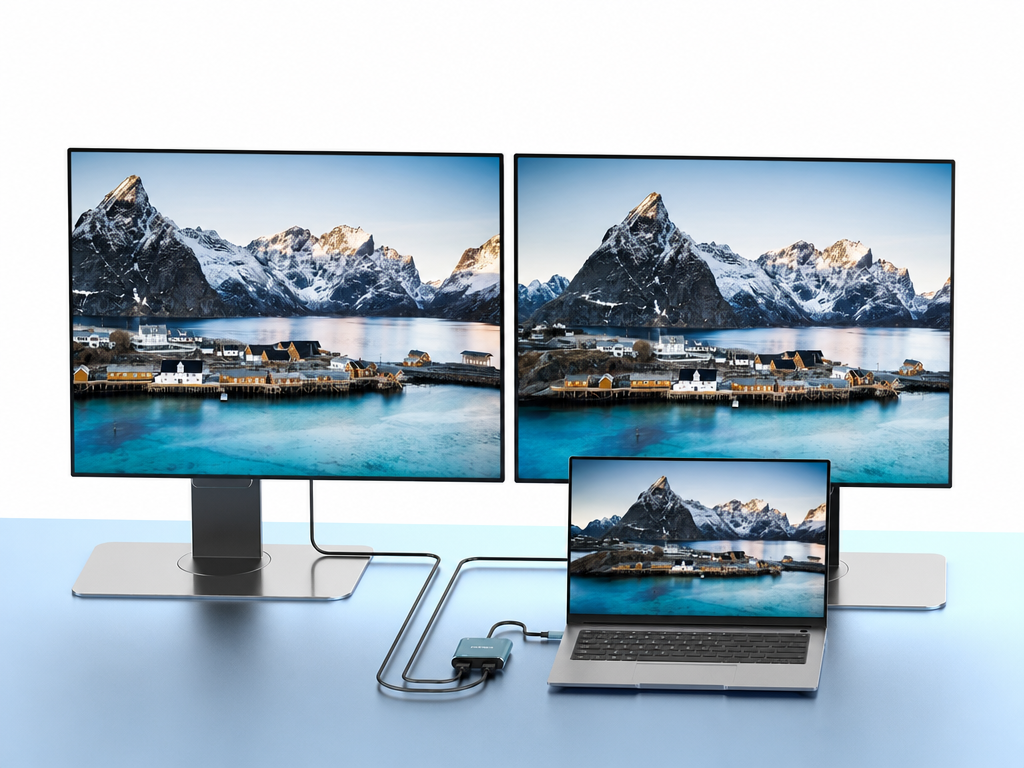
With a single USB-C connection, the OTN-9175K lets you drive two independent 4K monitors at 60Hz simultaneously — using Multi-Stream Transport (MST) technology to deliver two full-resolution displays from one port. Whether you're a creative professional, a data analyst, a developer, or a busy executive, this adapter redefines what your laptop is capable of.
Here's a deep dive into the real productivity benefits of the Onten OTN-9175K — and why a dual-monitor setup powered by this adapter might be the smartest investment you make for your work life this year.
What Is the Onten OTN-9175K?
The Onten OTN-9175K is a USB-C to Dual HDMI adapter powered by Multi-Stream Transport (MST) technology. Unlike simple display adapters that mirror or duplicate a single image across two screens, MST enables your laptop to treat each monitor as a completely independent, extended display — each running at its own resolution and showing its own content.
Key Specifications:
- Interface: USB-C (Thunderbolt 3/4 and USB-C DP Alt Mode compatible)
- Output: 2× HDMI ports
- Max Resolution per port: 4K (3840×2160) @ 60Hz
- Display Mode: Extended (MST) and Mirror
- Housing: Premium aluminum alloy — teal finish
- Cable: Integrated USB-C cable for strain-free connection
This is not a screen duplicator. This is a full triple-display workstation (your laptop screen + two external monitors) from a single cable — and that changes everything.
Benefit 1: Dramatically More Screen Real Estate — Instantly
The fundamental productivity benefit of the OTN-9175K is the most obvious one: you get three screens instead of one.
The average laptop screen is 13 to 16 inches. It's enough for basic tasks, but the moment you're toggling between a spreadsheet, a browser, a Slack window, an email client, and a video call — you're spending a surprising amount of time and mental energy just switching between windows.
With two external 4K monitors added via the OTN-9175K, you suddenly have room to spread everything out:
- Monitor 1: Your primary work — code editor, design canvas, document, or spreadsheet
- Monitor 2: Reference material, communication tools, dashboards, or video calls
- Laptop screen: Utilities, Spotify, task manager, quick-reference notes
You stop Alt+Tabbing. You stop minimizing and reopening windows. You stop losing your place. That mental overhead — tiny as each instance feels — adds up to a significant drain on your focus and time across an eight-hour workday.
More screen space means less context-switching, and less context-switching means deeper, more sustained focus on the work that matters.
Benefit 2: Crystal-Clear 4K Output on Both Screens — No Compromise
Not all dual-output adapters are created equal. Many sacrifice resolution on one or both ports to support dual output — delivering 1080p where you deserve 4K, or 30Hz where you expect a smooth 60Hz.
The Onten OTN-9175K makes no such compromise. Both HDMI ports output at full 4K resolution (3840×2160) at 60Hz simultaneously. That means:
- Razor-sharp text — no eye strain when reading long documents or lines of code
- True-to-life color accuracy — critical for designers, photographers, and video editors
- Smooth 60Hz refresh rate — fluid scrolling, smooth video playback, responsive UI
- No resolution downgrade — what you see on each screen is the full 4K experience
For professionals whose work product depends on visual accuracy — UI/UX designers, video producers, marketing creatives, architects, and engineers — the difference between 1080p and 4K output is the difference between approximate and precise.
At 4K, you can work on a full-resolution design mockup on one screen while referencing the live client brief on the other, both in perfect clarity. That's not just comfortable — it's professional-grade.
Benefit 3: MST Technology — True Extended Displays, Not Just Mirrors
This is the feature that separates the OTN-9175K from basic dual-output adapters: Multi-Stream Transport (MST).
Standard adapters without MST can only duplicate (mirror) the same image to two screens. MST, by contrast, allows your GPU to treat each connected monitor as a separate, independent display — each with its own resolution, its own content, and its own position in your virtual desktop layout.
What extended display mode enables:
- Drag windows freely across three screens (laptop + 2 external monitors)
- Run completely different applications on each monitor simultaneously
- Keep persistent, visible workspaces without hiding anything behind other windows
- Configure each monitor's orientation, resolution, and refresh rate independently
In practical terms, MST is what makes a dual-monitor setup genuinely useful rather than just visually impressive. Without MST, a second screen just shows the same thing as your first. With MST via the OTN-9175K, it shows something entirely different — and that's where the productivity gains live.
Benefit 4: Build a Professional Triple-Display Workstation Without a Desktop PC
Here's the often-overlooked power of the OTN-9175K: your laptop, combined with this adapter and two external monitors, becomes a fully functional three-screen workstation — with the portability of a laptop still intact.
In the morning, you dock your laptop, plug in one USB-C cable (the OTN-9175K), connect two monitors, and you're instantly at a three-screen desktop setup. In the afternoon, you unplug, pack your laptop, and head to a meeting — your mobile setup goes with you. No desktop PC required. No compromise on power.
This workflow is ideal for:
- Hybrid workers who need full productivity at the office desk and portability on the go
- Freelancers who work from different locations but need a powerful setup at their primary workspace
- Executives and managers who handle communication, data review, and presentations simultaneously
- Developers and engineers who run terminal windows, documentation, and IDE side by side
- Finance professionals who monitor live market data on one screen while modeling in Excel on another
The OTN-9175K is the cable that transforms your laptop from a portable device into a desktop-class workstation — and back again — in under 10 seconds.
Benefit 5: Eliminate Window-Juggling and Reclaim Your Focus
Modern knowledge workers switch between applications dozens — sometimes hundreds — of times per day. Every switch costs you a few seconds of mental reset time. At scale, that adds up to genuine, measurable lost productivity.
Psychologists refer to this as context-switching cost: the mental effort required to redirect your attention from one task to another. Even brief interruptions can break a flow state that took 20 minutes to establish.
A dual-monitor setup powered by the OTN-9175K directly attacks this problem. When every tool you need is simultaneously visible — not buried behind another window — you can maintain your primary focus without constantly redirecting your attention.
Real-world examples:
- A developer keeps their code on Monitor 1, documentation and Stack Overflow on Monitor 2, and Slack on the laptop screen — no switching, ever
- A project manager keeps their project dashboard on Monitor 1, email on Monitor 2, and their calendar on the laptop — everything visible at a glance
- A content creator keeps their writing on Monitor 1, research sources on Monitor 2, and Grammarly or style guides on the laptop screen
When your workflow fits on screen without hiding anything, you think faster, decide faster, and produce faster.
Benefit 6: Elevate Your Video Presentations and Client Meetings
The OTN-9175K isn't only for solo work sessions. It's also a powerful tool for professional meetings and presentations.
With two HDMI outputs, you can:
- Send your presentation to a projector or conference room display via one HDMI port, while keeping your presenter view (with speaker notes) on your laptop screen via the other
- Mirror your screen to two displays simultaneously for large rooms or panel setups with multiple screens
- Share one monitor with a colleague positioned across the desk during an in-person collaboration session, while continuing to work on your private screen
For client-facing professionals — sales teams, consultants, architects, educators — the ability to control exactly what your audience sees versus what you see is a significant advantage. The OTN-9175K gives you that control cleanly and simply.
Benefit 7: Reduce Physical Desk Clutter and Cable Complexity
Running a dual-monitor setup traditionally involves multiple cables, multiple adapters, a docking station, or a combination of all three. The OTN-9175K simplifies this dramatically.
One USB-C cable connects your laptop to the adapter. Two HDMI cables connect the adapter to your monitors. That's it. Three cables total for a full dual-4K-monitor setup — no docking station, no hub daisy-chain, no power brick for the adapter.
The practical result:
- Cleaner desk with fewer cables to manage
- Faster setup and teardown when moving between spaces
- Fewer points of failure — fewer adapters means fewer things that can go wrong
- No external power required — the adapter draws power through USB-C
A tidy workspace has a well-documented effect on mental clarity and focus. The OTN-9175K contributes to that tidiness by keeping your connectivity elegant and minimal.
Benefit 8: Premium Build That Lasts Through Daily Office Use
Productivity tools need to be reliable. An adapter that overheats, disconnects randomly, or falls apart after three months isn't a productivity tool — it's a liability.
The Onten OTN-9175K is built with a premium aluminum alloy housing that does two important things: it gives the device structural durability for daily handling, and it acts as a passive heatsink, dissipating heat generated during sustained 4K output without needing a fan or vents.
The integrated USB-C cable — rather than a detachable one — eliminates the most common point of failure in adapter designs: the connector joint. There's nothing to lose, nothing to misplace, and no port to wear out through repeated plugging and unplugging.
This is an adapter you buy once and use every day for years — which is exactly what a productivity tool should be.
Who Gets the Most Productivity Boost from the OTN-9175K?
| Professional Role | How the Dual-HDMI Setup Helps |
|---|---|
| Software Developers | Code on one screen, docs and terminal on another |
| Graphic & UI/UX Designers | Full-resolution design on one, reference and tools on another |
| Video Editors & Content Creators | Timeline on one screen, preview and assets on another |
| Finance & Data Analysts | Live dashboards on one, models and reports on another |
| Project Managers | Task boards visible while handling emails and comms |
| Sales & Business Development | CRM open alongside email, calls, and presentations |
| Executives & Team Leads | Data at a glance while staying on top of communications |
| Educators & Trainers | Lesson content on one screen, learner-facing display on another |
OTN-9175K vs. Single-Display Adapters: Why Dual Matters
| Feature | Single HDMI Adapter | Onten OTN-9175K (Dual HDMI MST) |
|---|---|---|
| Number of external monitors | 1 | 2 |
| Total display setup | 2 screens (laptop + 1) | 3 screens (laptop + 2) |
| Display mode | Extended or mirror | Extended (MST) or mirror |
| Max resolution per port | Up to 4K | 4K @ 60Hz per port |
| Productivity multiplier | Moderate | Significant |
| Ideal for | Basic use | Power users and professionals |
The leap from one external monitor to two is not incremental — it's transformative. The OTN-9175K makes that leap possible from a single USB-C port.
Frequently Asked Questions
Q: Does the Onten OTN-9175K work with MacBook Pro and MacBook Air? The OTN-9175K requires a USB-C port with DisplayPort Alt Mode or Thunderbolt 3/4 support. MacBook Pro models with Thunderbolt 3/4 support MST dual extended displays. Note that Apple Silicon MacBooks (M1 and later) have native limitations with MST extended mode via USB-C — they may display in mirror mode rather than fully extended across both screens unless used with a compatible Thunderbolt dock. Windows and Linux laptops with Thunderbolt 3/4 or USB-C DP Alt Mode enjoy full MST extended display support.
Q: Does it require external power? No. The OTN-9175K is powered entirely through your laptop's USB-C port. No separate power adapter is needed.
Q: Can both monitors run at 4K 60Hz at the same time? Yes — both HDMI ports support 4K (3840×2160) at 60Hz simultaneously when connected to a compatible host device with sufficient GPU bandwidth.
Q: What HDMI cables do I need? For 4K 60Hz output, use HDMI 2.0 or higher cables. HDMI 1.4 cables will limit output to 4K at 30Hz or 1080p at 60Hz.
Q: Can I use it for gaming? While the OTN-9175K supports 4K 60Hz output, MST adapters are primarily optimized for productivity and professional use. For high-refresh-rate gaming (above 60Hz), a dedicated gaming setup is recommended.
Final Verdict: The OTN-9175K Is a Productivity Multiplier
In the modern office, your ability to process information, maintain context, and execute across multiple workstreams simultaneously is a direct competitive advantage. The Onten OTN-9175K USB-C to Dual HDMI MST adapter gives you the display infrastructure to do exactly that — without a desktop PC, without a complex docking setup, and without sacrificing resolution or refresh rate.
Two 4K screens. One USB-C cable. Unlimited productivity upside.
If you're serious about working smarter, the OTN-9175K isn't an accessory — it's a workstation upgrade.
Tags: USB-C dual HDMI adapter, Onten OTN-9175K, MST adapter, dual monitor productivity, 4K 60Hz dual display, USB-C to HDMI, multi-stream transport, dual screen setup, laptop dual monitor, work from office setup, triple display laptop, dual HDMI USB-C
Category: Office Productivity | Display Accessories | Laptop Accessories | Work Setup
The Onten OTN-9175K is available at major electronics retailers and online marketplaces.
8 Real Benefits of Using a Compact USB-C to Gigabit Ethernet Adapter at the Office
How to Connect MHL on the Onten OTN-US125 USB Hub: Step-by-Step Guide (No MHL Phone Needed!)