

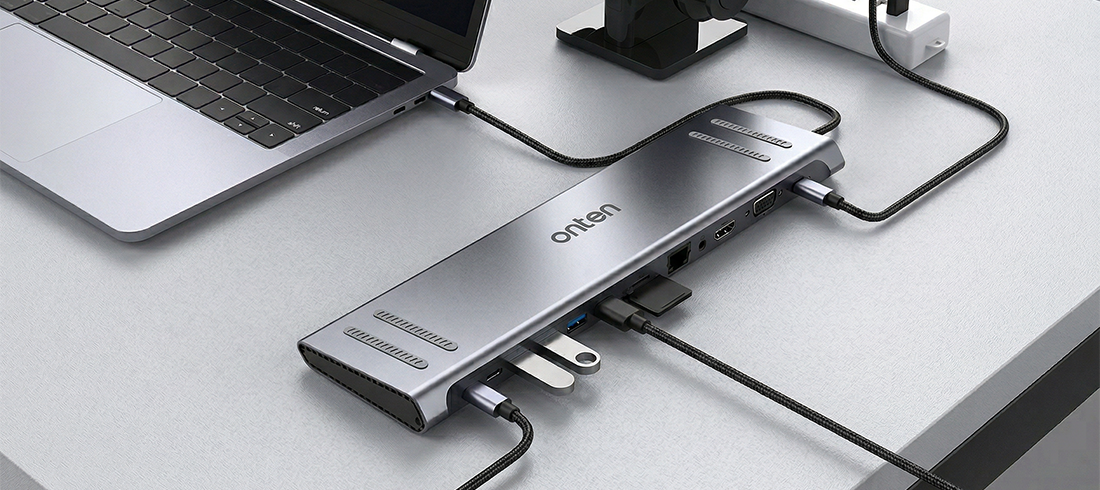
If you’ve purchased a laptop in the last few years, you’ve likely run into a frustrating reality: ports are disappearing. In the quest for razor-thin designs, manufacturers have stripped away the HDMI, Ethernet, and standard USB-A ports we rely on, leaving us with just a couple of USB-C connections.
We at Onten Indonesia are specializing in USB Hubs & Docking Stations. We provide a variety of USB Hubs that cover your daily office hour’s needs. From small USB hub to larger USB Docking often integrated with variety of ports such as, HDMI, VGA, 3.5mm Audio Port, and many more!
Our recommendation is the 13 in 1 USB Docking Station, because it has everything you need in a USB Docking with Economic prices!

What Makes Our USB Docking Great?
To bridge the gap, most people grab a cheap USB hub or a handful of dongles. But if you want to build a truly productive, seamless, and high-performance setup, those basic adapters won't cut it.
A docking station is not a splitter; it is a central command hub for your entire workstation. It sits on your desk, plugs into a wall outlet for its own dedicated power, and connects to your laptop via a single USB-C or Thunderbolt cable.
Here is why it dramatically outshines the alternatives:
1. One Cable to Rule Them All
The biggest selling point of a docking station is the "drop and work" convenience. When you sit down at your desk, you don't need to plug in a power cable, an HDMI cable for your monitor, and a USB hub for your peripherals. You simply plug in one single cable. Instantly, your laptop is charging, your monitors wake up, your mechanical keyboard is ready, and your internet is hardwired. When it's time to leave, you unplug that single cable and go.
2. Multi-Monitor Mastery
If you are doing any kind of heavy multitasking, creative design, or serious data work, multiple monitors are a must. Basic hubs often struggle to output to even a single 4K monitor smoothly. Docking stations are equipped with dedicated display protocols and multiple display outputs (HDMI, DisplayPort, and sometimes VGA for legacy equipment), allowing you to run dual or even triple high-resolution monitors without lag or screen flickering.
3. True Power Delivery (PD)
Because a docking station plugs directly into the wall, it features "Power Delivery" or "Pass-Through Charging." This means the same cable that connects all your accessories to your laptop also charges your laptop at full speed (often up to 100W). It completely eliminates the need to unpack your laptop's bulky charging brick every time you sit at your desk.
4. Uncompromised Speed and Reliability
When you are transferring massive files or playing competitive games, a dropped connection is a disaster. Docks provide a stable, dedicated Gigabit Ethernet port for hardwired internet—crucial for smooth livestreaming or fast downloads. Additionally, they offer high-speed USB 3.1 or Gen 2 ports that won't bottleneck when you transfer data to external SSDs.
5. A Cleaner, Professional Aesthetic
Cable management matters. A docking station allows you to plug all your permanent desk fixtures—monitors, ethernet, speakers, external drives—into the back of the dock, hiding the wires out of sight. The result is a clean, minimalist desktop that looks great and reduces distractions.
The Verdict
A basic USB hub is a band-aid for traveling. A USB Docking Station is a permanent solution for productivity.
While docking stations require a higher upfront investment than a simple dongle, the return on investment is immediate. By transforming a single laptop port into a powerhouse of connectivity, you save time, eliminate desk clutter, and unlock the full potential of your external hardware. If you are serious about your setup, it’s time to ditch the dongles and get docked with our docking station products.
What is MHL Adapters?