

ONTEN OTN-E923 Wire Tracker & Cable Tester Review: RJ45 & RJ11 Step-by-Step Guide
Introduction
Tracing a single network or phone cable through a wall full of wires can feel like searching for a needle in a haystack — unless you have the right tool. The ONTEN OTN-E923 Wire Tracker & Wire Tester is designed exactly for this job, combining RJ45 and RJ11 cable testing with an audio-based wire tracking feature, a built-in flashlight, and a full set of accessories to get you started right out of the box.
This step-by-step guide covers everything from unboxing to troubleshooting, so you can confidently test and trace cables for networking, telephone, or general wiring tasks.
What Is the ONTEN OTN-E923?
The ONTEN OTN-E923 is a dual-function wire tracker and cable tester built for both RJ45 (Ethernet/network) and RJ11 (telephone) cables. It allows you to verify whether a cable is wired correctly and, more importantly, to physically locate and trace a specific cable among a bundle of others using sound-based tracking.
Key Specifications at a Glance
| Feature | Detail |
|---|---|
| Supported Connectors | RJ45 and RJ11 |
| Core Functions | Wire tracking (with sound) and wire testing |
| Audio Input | 3.5mm audio jack |
| Extra Feature | Built-in flashlight |
| Testing Capability | Cable scan and continuity testing |
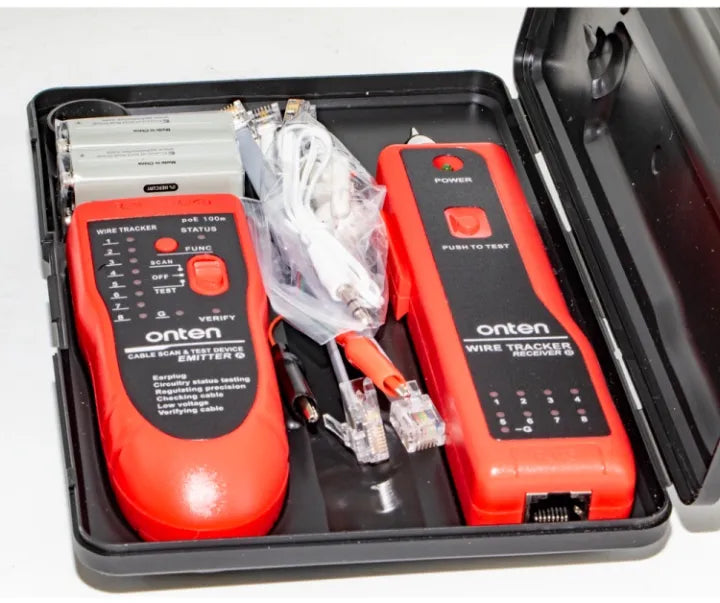
| Included Accessories | RJ45 cable, RJ11 cable, RJ11-to-power cable, earphone |
| Color | Red-Black |
Step 1: Understand the Two Core Functions
The OTN-E923 combines two related but distinct tools in one device:
- Wire Testing — Checks whether a cable's internal wiring is correctly connected, identifying issues like broken wires, miswiring, or short circuits.
- Wire Tracking — Uses an audio tone sent through the cable to help you physically locate that exact cable among a bundle of others, using the included earphone to listen for the signal.
Step 2: Unbox and Identify Included Accessories
Before starting, lay out all the included components:
- Main tester/tracker unit
- RJ45 cable (for network/Ethernet testing)
- RJ11 cable (for telephone line testing)
- RJ11-to-power cable (for tracking cables using a power connection)
- Earphone (for listening to the tracking tone via the 3.5mm jack)
Having all accessories identified beforehand makes the testing and tracking process much smoother.
Step 3: Test an RJ45 (Network) Cable
- Plug one end of the RJ45 cable into the main tester unit.
- Connect the other end of the cable to the device or wall port you want to test.
- Power on the tester.
- Observe the testing indicators to check for continuity issues, miswiring, or breaks in the cable.
- Repeat with the remote (receiver) unit if your specific model includes a separate transmitter/receiver pair for end-to-end testing.
Step 4: Test an RJ11 (Telephone) Cable
- Plug one end of the RJ11 cable into the main tester unit.
- Connect the other end to the telephone line or wall jack you want to test.
- Power on the tester and check the results in the same way as the RJ45 test.
- Use the RJ11-to-power cable if you need to test or trace a line using an active power source.
Step 5: Use the Wire Tracking Feature
This is where the OTN-E923 really shines for locating cables in walls, ceilings, or cable bundles:
- Connect the cable you want to trace to the tester's transmitter.
- Plug the included earphone into the 3.5mm audio jack on the receiver/tracking end.
- Power on the tracking function so it sends an audio tone through the cable.
- Use the receiver to scan along the bundle of cables — when you get close to the correct cable, you'll hear the tone clearly through the earphone.
- Mark or label the identified cable once located.
Step 6: Use the Flashlight Feature
For tracing cables in dark spaces like ceilings, crawl spaces, or behind furniture:
- Activate the built-in flashlight using its dedicated button or switch.
- Use it alongside the tracking or testing process to see connection points clearly in low-light areas.
Step 7: Troubleshooting Common Issues
| Problem | Likely Cause | Solution |
|---|---|---|
| No tone heard while tracking | Loose connection or low battery | Check cable connections; replace or charge batteries |
| Test shows incorrect wiring | Cable is genuinely faulty | Replace or re-terminate the cable |
| RJ11 test not working | Wrong cable used | Confirm you're using the RJ11 cable, not RJ45 |
| Flashlight not turning on | Battery issue | Check and replace batteries if needed |
| Audio jack not working with earphone | Loose connection | Ensure earphone is fully inserted into the 3.5mm jack |
Why Choose the ONTEN OTN-E923?
- Dual cable type support — Test and trace both RJ45 network cables and RJ11 phone lines with one tool.
- Sound-based tracking — Makes it far easier to locate a specific cable in a bundle compared to visual tracing alone.
- Built-in flashlight — Adds practical functionality for working in dark or hard-to-reach spaces.
- Complete accessory kit — Comes with the cables and earphone needed to start testing immediately.
- Versatile use cases — Useful for home networking, telephone line troubleshooting, and general electrical wiring tasks.
Who Is This Tool Best For?
- Network technicians and IT professionals installing or troubleshooting Ethernet cabling
- Electricians and installers who need to trace phone or network lines through walls
- Homeowners setting up or troubleshooting home networking and telephone wiring
- Anyone dealing with a tangled bundle of unlabeled cables who needs to identify a specific one
Final Thoughts
The ONTEN OTN-E923 Wire Tracker & Wire Tester is a practical, all-in-one tool for anyone who regularly works with RJ45 or RJ11 cabling. Its combination of continuity testing, sound-based wire tracking, and a built-in flashlight makes it useful for both diagnosing cable issues and physically locating specific cables in complex wiring setups.
With a full accessory kit included — RJ45 cable, RJ11 cable, RJ11-to-power cable, and earphone — you can start testing and tracing cables right out of the box. Whether you're a professional installer or simply trying to untangle your home's network wiring, the OTN-E923 offers a reliable, budget-friendly solution.
ONTEN 8306 HDMI 2.0 Cable 4K 60Hz Review: Why It's a Reliable Choice for Your Display Setup
Cara Menyambungkan iPhone USB-C ke Monitor Pakai Kabel USB-C to HDMI Onten