
ONTEN OTN-UC938 Type-C to DisplayPort Converter Review: 8K 60Hz Cable Guide

Introduction
If you're searching for a reliable way to connect your laptop, tablet, or smartphone to a high-resolution monitor, the ONTEN OTN-UC938 Type-C to DisplayPort Converter is worth a close look. Designed for users who need crisp, high-refresh-rate visuals, this cable delivers up to 8K at 60Hz, making it a strong choice for creative professionals, gamers, and everyday users who want a clutter-free desktop setup.
In this step-by-step guide, we'll walk through what the OTN-UC938 offers, how to set it up correctly, and why it might be the right cable for your workstation.
What Is the ONTEN OTN-UC938?
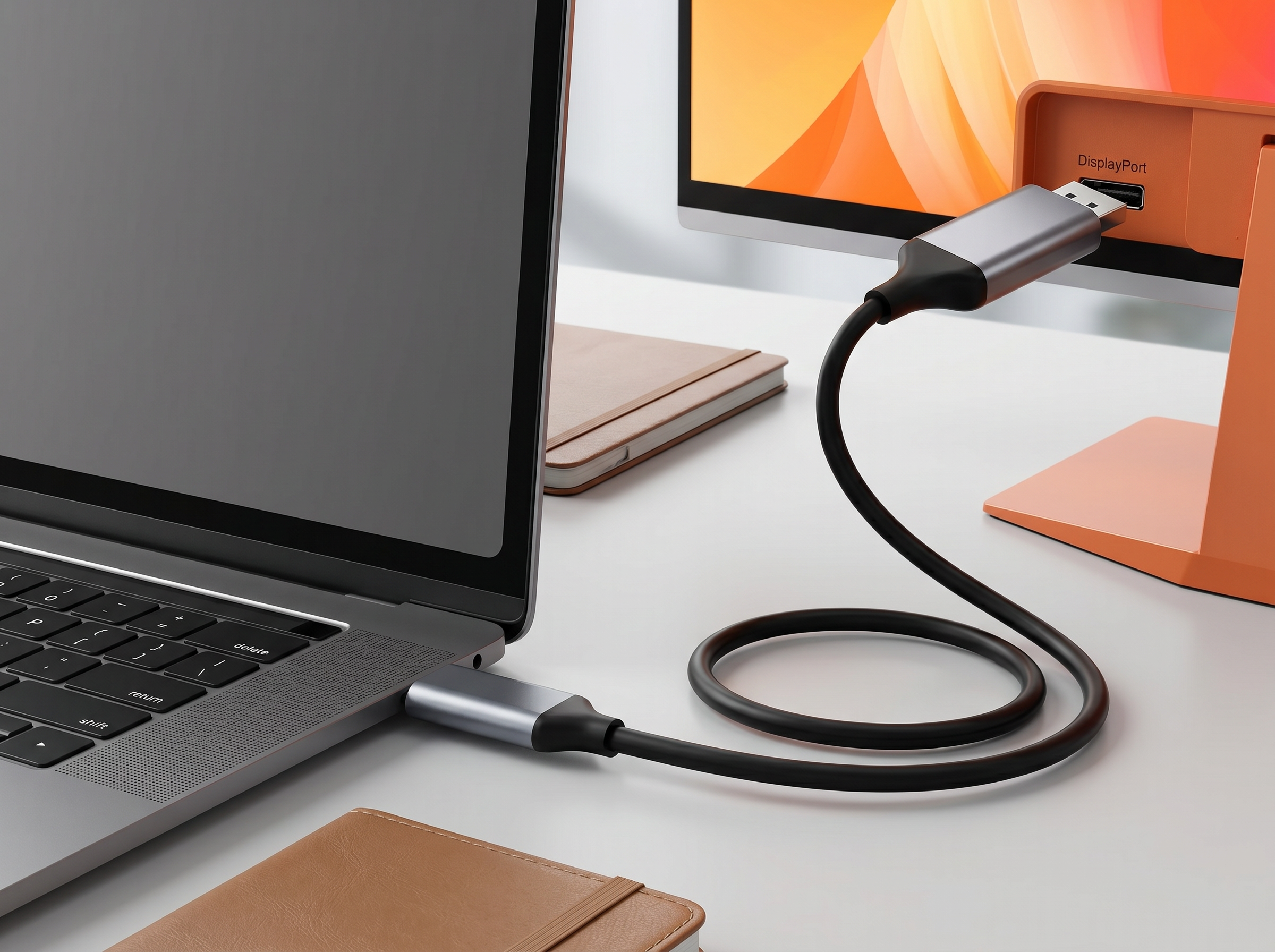
The ONTEN OTN-UC938 is a USB Type-C to DisplayPort converter cable built specifically to transmit video signals from a Type-C-enabled device directly to a DisplayPort monitor. Unlike multi-port hubs, this is a dedicated, single-purpose cable focused purely on video output, which means fewer points of failure and a more stable connection.
Key Specifications at a Glance
| Feature | Detail |
|---|---|
| Connector Type | USB Type-C (input) to DisplayPort (output) |
| Maximum Resolution | Up to 8K @ 60Hz |
| Output Function | DisplayPort output only |
| Required Standard | DP Alt Mode or MHL |
| Cable Length | 1.8 meters |
| Color | Silver |
Step 1: Understand How the OTN-UC938 Works
This converter relies on DisplayPort Alt Mode (DP Alt Mode), a technology built into many modern USB-C ports that allows the port to carry a native DisplayPort video signal instead of standard USB data. Some devices use MHL (Mobile High-Definition Link) instead, which the OTN-UC938 also supports.
Before purchasing or using this cable, it's important to confirm your source device — laptop, phone, or tablet — actually supports DP Alt Mode or MHL through its USB-C port. Not all USB-C ports carry video signals, so this step prevents a frustrating "no signal" experience after setup.
Step 2: Check Device Compatibility
To get the most out of your ONTEN OTN-UC938, verify the following:
- Your device's USB-C port supports video output. Look in your laptop or phone's manual, or search "[your device model] DP Alt Mode support."
- Your monitor has a DisplayPort input. Since this cable outputs DisplayPort only, your monitor or TV needs a DP port to receive the signal.
- Your monitor supports 8K 60Hz (if you want the maximum resolution). Most monitors today max out at 4K, so check your display's specs if ultra-high resolution matters to you.
Step 3: Connect the Cable
Setting up the OTN-UC938 is straightforward:
- Plug the USB-C end into your laptop, smartphone, or tablet.
- Plug the DisplayPort end into your monitor's DP input.
- Power on your monitor and select the correct DisplayPort input source using your monitor's remote or on-screen menu.
- Your computer or device should automatically detect the external display.
Step 4: Adjust Display Settings
Once connected, you may need to fine-tune your resolution and refresh rate:
- On Windows: Go to Settings > System > Display, select the external monitor, and adjust resolution and refresh rate as needed.
- On macOS: Go to System Settings > Displays and choose your preferred resolution.
- On Android/Linux devices: Display settings vary by device, but most will auto-detect the external screen once connected.
If you don't see 8K or 60Hz as an option, double-check that both your source device and monitor support those specs — the cable can only carry what both ends are capable of producing.
Step 5: Troubleshooting Common Issues
| Problem | Likely Cause | Solution |
|---|---|---|
| No signal on monitor | Device doesn't support DP Alt Mode | Check device specs; try a different USB-C port |
| Image flickering | Loose connection or unsupported resolution | Reseat cable; lower resolution/refresh rate |
| No 8K option | Monitor or GPU doesn't support 8K | Confirm monitor and device specs |
| Cable not recognized | Damaged port or cable | Test on another device to isolate the issue |
Why Choose the ONTEN OTN-UC938?
- High-resolution support — Up to 8K 60Hz future-proofs your setup as monitors evolve.
- Dedicated video output — A single-purpose cable means a simpler, more stable connection versus multi-function hubs.
- Compact and portable — At 1.8 meters, it's long enough for desk setups but still travel-friendly.
- Broad compatibility — Supports both DP Alt Mode and MHL standards.
Who Is This Cable Best For?
- Professionals connecting laptops to external monitors for productivity or design work
- Gamers wanting a clean, single-cable connection to high-refresh-rate displays
- Anyone replacing a bulky docking station with a simple, direct video cable
Final Thoughts
The ONTEN OTN-UC938 Type-C to DisplayPort Converter is a practical, no-frills solution for anyone needing reliable video output from a USB-C device to a DisplayPort monitor. With support for resolutions up to 8K at 60Hz, it's well-suited for both everyday use and more demanding visual work — as long as your devices support the underlying DP Alt Mode or MHL standards.
Before buying, double-check your laptop or phone's USB-C video output capability and your monitor's DisplayPort input, and you'll be set up for a smooth, high-quality display experience.
ONTEN OTN-US313 HDMI Video Capture Cable Review: How to Set Up 1080p Capture in Minutes
ONTEN OTN-UC125 5-in-1 USB-C Hub Review: HDMI, LAN & PD3.0 Charging Guide